06/09/26 | Bug Fixes: Patient Reminders: We've fixed an issue where removing a phone number from a patient record in Dentrix was not being reflected in Reminders. Phone number removals now sync correctly, ensuring appointment, treatment, and recall reminders respect the latest contact information in Dentrix.
|
05/26/26 | Improvements: |
|
05/05/26 | Improvements: Appointment Reminders, Recall Reminders, & Reviews: Leap now honors each patient's texting communication preference across all automated reminder types. When a patient's text toggle is turned off, Leap will skip sending text reminders entirely — including Appointment, Recall, and Review reminders — giving your team more precise control over which patients receive automated texts.
|
04/21/26 | Improvements: Patient Forms: Improved the stability and reliability of patient forms by adding safeguards to better track form submissions and enhancing error handling and retry logic. These improvements help ensure patient responses are captured completely and filed to Dentrix consistently, reducing the risk of incomplete submissions and filing errors. Patient Forms: When a Dentrix form filing attempt fails due to a connection issue with the Dentrix API, Leap now detects and surfaces a specific error message — rather than a generic support prompt — so your team knows to restart the server and can take immediate action without needing to contact support first.
Bug Fixes: Appointment Reminders & Reviews: Fixed an issue where the Operatory picker in the Reminders and Reviews exclusion settings displayed the full operatory name instead of the operatory ID used in Dentrix. The dropdown and selected values now show the correct operatory identifier (e.g., "Op 1"), making it easier to match exclusions to the operatories configured in your system.
|
03/31/26 | New: Dentrix Ascend Integration: Yapi Leap now supports integration with Dentrix Ascend, bringing Leap's patient communication and digital forms features to practices on the Dentrix Ascend platform. If your practice is planning to switch to Dentrix Ascend, please reach out to Yapi Support proactively before making any changes to help minimize service downtime — email us at helpdesk@yapicentral.com or Submit a Request.
Improvements: Patient Forms: When previewing or signing patient forms that include special questions using the dropdown display option, Leap now shows only the option(s) the patient selected — matching the generated PDF output and making it faster to review responses without scrolling through the full list of choices.
Bug Fixes: Appointments: Fixed an issue where appointments that were previously marked as broken and then restored in Dentrix were not appearing on the practice homepage or becoming available for fill appointment workflows. Appointment status now syncs correctly when a break is undone, ensuring those appointments are visible and accessible as expected. Online Scheduling: Fixed an issue where operatory checkboxes in Online Scheduling Setup > Provider Scheduling Rules appeared misaligned when a provider had more than 10 operatories. Checkboxes now display in a uniform, consistent grid regardless of how many operatories are configured, making scheduling rule setup easier to navigate. Sync: Resolved several sync stability issues that could prevent patient records from saving correctly. Leap now automatically removes invalid characters from patient and insurance data during sync, and ensures patient address fields are properly handled regardless of length — reducing sync failures and improving reliability when processing data from Dentrix.
|
03/17/26 | Improvements: Forms: When a patient form shows a "Refile Required" status, Leap now displays the specific reason the form couldn't file — such as a duplicate SSN, invalid ZIP code, patient not found, connection issues with Dentrix , an uninitialized API, or a missing document category. This makes it easier for your team to quickly identify and resolve filing issues without guesswork, reducing administrative burden and getting forms filed faster. Review our updates to Form Filing: Refile Required Errors for quick reference. Forms: Improved the reliability of background form processing to recover more quickly from transient errors, reducing the time forms may be delayed before successfully filing to Dentrix.
Bug Fixes: Online Scheduling: Resolved an issue where Online Scheduling operatory settings could be unintentionally disabled after a routine data sync with your practice management system. Your operatory configurations are now preserved during syncs, and affected practices will have their settings restored automatically. Online Scheduling: Fixed an issue in Dentrix where new patients could not complete the online scheduling process when selecting a secondary provider, resulting in an error after entering the verification code. New patient appointment requests with secondary providers are now completed successfully.
|
03/03/26 | New: Forms: You can now download all patient-submitted forms and attachments for a specific appointment directly from the Patient Profile. Simply click the 3-dot menu on any appointment in the Upcoming or Past tabs and select "Download Forms" to receive a ZIP file with everything you need — perfect for recordkeeping, transferring documentation, or retrieving forms that may no longer appear in the Forms tab.
Improvements: Yapi Data Sync: We've optimized how Yapi syncs data with your Dentrix practice management system. Practices with large patient databases should notice reduced server slowness and improved system responsiveness during routine background syncs. This update minimizes the load placed on your Dentrix database, helping your front desk and clinical workstations stay fast throughout the day.
Bug Fixes: |
02/17/26 | New: We've enhanced our toll-free text messaging setup to meet updated carrier requirements. Starting February 17th, if you're setting up a new toll-free number, we'll request your business and basic tax information to comply with carrier verification standards. This ensures your toll-free numbers remain compliant and ready for patient text messaging.
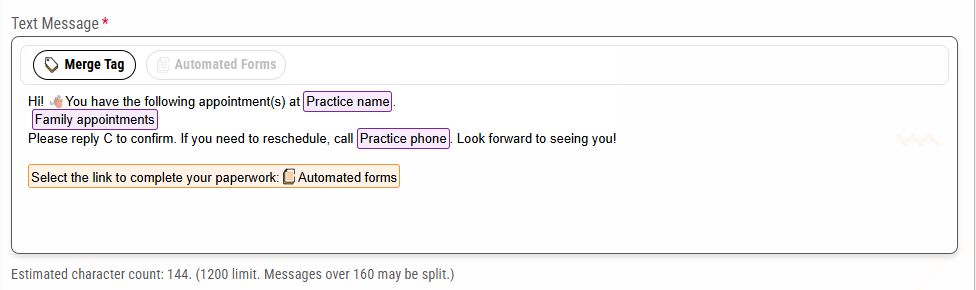
Improvements: We've redesigned the text message composition experience with an improved interface that makes sending messages more intuitive. The new design includes an emoji picker for quick emoji selection, an auto-expanding message field that grows as you type, and streamlined access to text templates and merge tags—all designed to make patient communication faster and easier.
Bug Fixes: We've resolved an issue where outbound text messages would sometimes display as "Queued" even after they had been successfully delivered. Text message status now accurately reflects the actual delivery state, giving you reliable visibility into your communication with patients. When duplicating forms from the template library to your practice, file upload components now properly reset. This ensures that import destination settings are cleared and can be configured according to your practice's specific workflow needs, preventing any carryover of incompatible settings from the template.
|
02/03/26 | New: Notice of Privacy Practices (2026 HIPAA Reqs): The updated Notice of Privacy Practices Acknowledgement & Consent v2 (2026) template is now live in the Forms Template Library (English + Spanish) to support the Feb 16, 2026 HIPAA NPP updates. This is provided as a template only. Customers should confirm final wording with their attorney/compliance counsel.
Bug Fixes: Homepage Schedule: Fixed an issue where the Daily Production Goal displayed incorrect calculations based on remaining days in the month. Your homepage production goals now accurately reflect your progress toward monthly targets, helping you make informed business decisions throughout the month. Forms: Fixed an issue where office tasks were not being updated when a form was reassigned from one appointment to another. This prevented forms from being properly filed and could cause them to become stuck in "waiting on PDF generation" status. Forms now correctly maintain their office task relationships when reassigned between appointments. Text Messaging: Fixed an issue where text messaging would incorrectly reject valid Puerto Rico phone numbers with area code 787, displaying a 'must be 10 digits' error. Text messaging now properly supports all valid US phone numbers, including Puerto Rico. Email Confirmations: Fixed an issue where patients would see an error message when confirming appointments through email reminders, even though the appointments were successfully confirmed. The appointment confirmation process now completes smoothly without displaying unnecessary error messages to your patients.
|
01/20/26 | Improvements: Patient Forms: Enhanced patient form reliability by adding data validation that prevents oversized form submissions, ensuring forms process smoothly without errors. Forms: Improved the reliability of patient forms filing to your practice management system by optimizing background processing, reducing duplicate submissions, and ensuring forms sync more consistently.
Bug Fixes: Text Messaging: Resolved an issue where deleted patients with attached mobile numbers were incorrectly appearing in text message recipient lists, ensuring patient status standardization through the application Text Messaging Search and Filter: Resolved an issue where the Clear Search button disappeared when navigating away from the text messaging page after a search, making it easier to clear search results and view all message threads. Text Messages: Improved text message preview readability by fixing word wrapping behavior, ensuring words display completely on each line rather than breaking mid-word across lines.
|
12/17/25 | Bug Fixes: Forms could be activated without an import category assigned, causing them to fail to file with "Refile Required" errors. The system now ensures all forms have a valid import destination before activation, preventing filing failures.
|
12/9/25 | Improvements: Form Builder: Medical Conditions, Allergies, and Medications can now be configured as dropdown fields, significantly reducing scrolling and shortening your Medical History forms. Existing patients can easily review the previous selections. Only the patient selections will display on the PDF.
Bug Fixes: Dentrix Form Filing Reliability: Resolved an issue where patient forms appeared to transfer successfully in Leap but failed to import into Dentrix. Forms now file reliably to your Dentrix system, ensuring all patient documentation is properly stored and accessible. Patient Forms Duplicate Prevention: Resolved an issue where patients receiving both Save the Date and other reminders at the same time created duplicate form assignments. Now, only one patient card appears per appointment, streamlining your forms workflow and preventing confusion. Dentrix Appointment Status Protection: We've implemented safeguards to preserve completed appointment statuses. Previously, when patients clicked 'Confirm' in email reminders after their appointment was already marked complete in Dentrix, the status would incorrectly revert to the confirmed status. Now, the system validates appointment status to maintain data integrity and prevent completed appointments from being overwritten.
|
11/25/25 | Improvements: TipWhile this update to session timeout provides convenience during your workday, maintaining HIPAA compliance requires active maintenance of these best practices: Log out manually when leaving your workstation for extended periods Lock your computer (Windows: Win+L, Mac: Cmd+Control+Q) when stepping away, even briefly Never leave your device unattended while logged into Leap in patient care areas Use the "Log Out" button at the end of your day, rather than relying on browser closure Ensure screens are positioned so patient information isn't visible to unauthorized individuals
Remember: The extended session is designed to reduce interruptions during active work, not to replace security protocols. Your practice remains responsible for ensuring unauthorized individuals cannot access patient data on logged-in devices. When Form Automation is enabled, Save the Date reminders now automatically include patient form links for appointments scheduled within 30 days, giving patients more time to complete their paperwork before their visit.
When patients reschedule their appointments, Leap now sends fresh Confirmation, Premedication, and Same Day reminders (if configured) based on the new appointment date and time—ensuring patients receive timely notifications even after rescheduling. Enhanced reliability for Dentrix plugin connections, improving stability when accessing Dentrix data from Leap across different system configurations.
Bug Fixes: |
11/11/25 | Improvements: |
10/22/25 | Improvements: Applicable Tooth Number(s) and Quadrants now automatically prefill for patients to review when completing a Consent form with a new Question Tag: sys.toothnum available in the Form Editor. This new Question tag has been applied automatically to any forms with Tooth Number(s) and Quadrant(s) questions. To complete the Tooth Number prefill setup, add relevant procedure codes in form automation settings.
Enhanced the reminder system's performance and reliability by optimizing how reminders are processed and sent. This improvement ensures more consistent and reliable delivery of appointment reminders, especially during peak sending times, while maintaining system stability.
Bug Fixes: Fixed an issue where form automation wasn't properly tracking patient submissions across different form versions. Previously, if you edited a form template after a patient submitted it, the system might send the form again too soon. Now, the automation correctly checks the most recent submission date regardless of form version changes, ensuring patients receive forms only at the intervals you've configured.
|
10/08/25 | Bug Fixes: |
9/24/25 | Improvements: Added 4 new campaign templates to help you better engage with your patients, including specialized templates for Veneers, Thanksgiving promotions, "We've Moved" announcements, and seasonal campaigns. When the Yes/No Input field is enabled for the Medical Conditions, Allergies, or Medications question, Leap now pre-fills an existing patient’s “No” response on the form. New patients will still be required to answer Yes or No to these questions. Enhanced the system's ability to handle larger insurance amount values from Dentrix, eliminating sync errors and ensuring all insurance data is captured accurately.
Bug Fixes: Text conversations were missing a scroll bar, preventing the patient’s last message from displaying. As a result, you could only view part of the text history instead of the full 30-day record. This issue has been fixed. Text alignment issues appeared when previewing reminder templates in Practice Settings. The overlay now properly handles longer templates and displays them with improved alignment and consistency. After-hours notifications weren't displaying at initial login. Notifications now appear promptly at login without interacting with the notifications panel.
|
8/27/25 | Improvements: Bug Fixes: Assigning forms from your office tablet was taking longer than expected. This issue has been resolved. Patients with inactive, archived, or deleted family members in Dentrix who submit forms that include the patient information question get stuck, requiring the form to be refiled. This issue has been resolved.
|
8/13/25 | Improvements: When a new patient completes forms for their first appointment and Leap creates a Dentrix family file, we’ll now use the Default Primary Provider from the Practice Settings page when filing those forms. If no default is set, Leap will use the first active provider in your list. This update helps prevent issues that occur when the appointment only has a secondary provider attached and enables us to automatically file completed forms to the Dentrix Document Center. Leap Form updates:
Bug Fixes: The issue where patients were incorrectly removed from the In Office tab and their appointment status was mistakenly set back to Unconfirmed. The Multiple Choice question on a form forces the patient to enter information into the Other field, even when it's not selected.
|
7/30/25 | Improvements: Bug Fixes: Logic rules for the "Is the patient 18 or older" question on the Medical History form have been fixed. Patients can now see follow-up questions as intended when answering this question. We fixed the issue that caused users to be logged out before the 2-hour mark. Any patient forms attached to a broken appointment are now filed to Dentrix (without a provider signature) instead of being moved to Forms Outstanding Tasks Tab.
|
7/16/25 | We've made some improvements. A new Default Primary Provider field has been added to the Practice Information screen (Dentrix Integration tab). This field supports Dentrix's updated new patient workflow in version 24.10 or higher, which requires all new patients (or new Family Files) to have a primary provider. Once this field is set, if an appointment lists only a secondary provider, Leap will assign the default provider automatically.
We've fixed some the following things: Leap text message notification bubbles no longer reappear after you've read the text message. The Smart Signature field shows providers that are not active. The email field on patient forms was erroneously being case sensitive, which caused an error when a patient entered capital letters in their email address. Items on the Outstanding Tasks tab not displaying in the correct order have been fixed. Outstanding tasks are now properly sorted with the oldest Appointment Date and start time at the top of the list.
|
7/2/25 | We've fixed some things: Online Scheduling appointment notifications now display the correct appointment time in both the notification panel and pop-up. Previously, the times were 7 hours late. Text messages using templates longer than 480 characters were previously getting cut off. You can now send texts up to 1,200 characters without issues. Communication Error notifications now show when using "Show all filters" in the Notifications panel. Previously, these notifications were only visible when manually selecting Communication Error in the Filters list. When sending a fill appointment text, you can now use a text template without seeing the "There's a Problem" error message. Notifications for Patient Text Replies to Short Code Numbers were not displaying
|
6/18/25 | We've made some improvements: When a multiple-choice question uses checkboxes on a patient form, Leap now allows patients to deselect previously selected answers. Inbound text notifications have been updated to show a paperclip icon when a patient's text includes one or more images.
|
6/4/25 | We've made some improvements... ...and fixed some things: When resending a text, Leap was showing the message status as "Failed" instead of "Delivered", when successful. When creating a new form and adding the Contact Info question into the form, the "Use this address for all family members?" question is no longer missing.
|
5/21/25 | We've made some improvements: ...and fixed some things: Closing and reopening the Text Messages tab now clears the previous search. Filtering Notifications by New now shows all new notifications, no matter what page of the Notifications panel you're on. We received reports that when a patient accepted a same-day recall appointment (by responding "Yes" to a Fill Appointment text), the appointment didn't automatically schedule in Dentrix. This has been fixed.
|
5/7/25 | We've added 13 new templates to the Campaigns page. |
4/23/25 | We've fixed some things: Same Day Reminders now send at the times configured in reminders settings instead of all Same Day Reminders sending at the configured time the day prior to an appointment. We discovered that patient and appointment information were not syncing Dentrix for some practices. This has been fixed. Patients no longer see a "Link Has Expired" error when trying to access their forms through a valid link.
|
4/9/25 | We've made some improvements: We’ve improved the performance of Leap's automated form filing by limiting the number of signatures you can add to a form in the Form Editor. You can now add up to 4 signature boxes, and for Smart Signatures, only 1 can be a provider signature.
...and fixed some things: We received reports that when forms sent via the New Patient Welcome message were updated later in the Form Editor, patients were also sent the second version if they moved their appointment, resulting in duplicates. This has been fixed. Previously, patients who tried to open forms from an expired link received a "Problem with Device" error message, which caused some confusion. This has been corrected so that anyone who uses an expired link now receives the appropriate "Expired Link" error message instead. We received reports that patients who had previously confirmed an appointment and then rescheduled it could not confirm their new appointment time via text. This has been fixed. Patients are now able to confirm their appointment from any Confirmation Reminder they receive, and we've improved how Leap processes appointment confirmations to make confirmations more reliable.
|
3/26/25 | We've fixed some things: |
3/12/25 | We've made some improvements: We've added new consolidated adult/child forms to our Form Templates. These new Medical and Dental History forms now show different questions based on a patient's age and can be used for both adults and children. To get these new forms, follow our instructions Using Yapi’s Consolidated Dental History & Medical History Forms. For families with appointments on the same day: Leap now groups appointment reminders for family members whose appointments include at least one child and have a gap of 15 minutes or less between their appointments. For family groups containing only adults, each family member will receive their own separate reminder showing only their own appointment information.
When selecting how far out to send a confirmation reminder in Appointment Reminders, the dropdown now only shows 10 options at a time in a scrollable list, so it can be more easily viewed on all screen sizes.
...and fixed some things: We had some reports that form links were disappearing from the New Patient Welcome text template. This has been fixed. We received reports that when one family member confirmed their appointment via reminder, this incorrectly confirmed the appointment for another family member instead. This has been fixed. The "Visit Us" link that shows once a patient has confirmed their appointment via email or text now correctly routes to your practice's website.
|
2/26/25 | We've made some improvements: Existing patients now receive a new Save the Date reminder, and new patients receive an updated New Patient Welcome message if they reschedule their appointment. You can now set recall reminders to send 1, 7, 14, 21, 30, 45, 60, 75, or 90 days before a patient is due.
...and fixed some things: The Leap homepage now always defaults to today's schedule upon login. Some practices reported seeing an error when assigning forms to one family member via QR Code and another family member via a Linked Device. This has been fixed. Some practices reported that trying to access the Insurance tab in a patient's Profile caused Leap to show a blank white screen. This has been fixed. Some practices reported that certain menu items, like Forms and Campaigns, would intermittently disappear from the side navigation menu. This has been fixed.
|
2/12/25 | We've made some improvements: Patients can now send you images in texts (.JPG, .PNG, and .GIF) like insurance cards and identification. You can view a larger version of the image by clicking on its thumbnail in your text thread, and you can download each image to your computer. Save the Dates now and send for all new appointments. (Previously, these were only sent for appointments more than 15 days away.)
|
1/29/25 | We've made some improvements: ...and fixed some things: |
1/15/25 | We've fixed some things: All new appointments scheduled through Online Scheduling now show in Notifications. New Patient Welcome messages no longer require the Save the Date option to be enabled in Appointment Reminders. When using the Provider filter on the homepage or when filling an appointment and selecting Provider as a filter, only active providers now show in the list.
|
1/6/25 | We've made some improvements: |